
Article
CCTV Integration with IBMS
Oct 2026
Direct Answer
CCTV integration with an Integrated Building Management System (IBMS) provides central visibility of approved camera status, recording health and video-related events. The dedicated Video Management System (VMS) remains responsible for core video processing, recording and surveillance functions unless a project-approved design specifies otherwise.
1. Engineering Overview
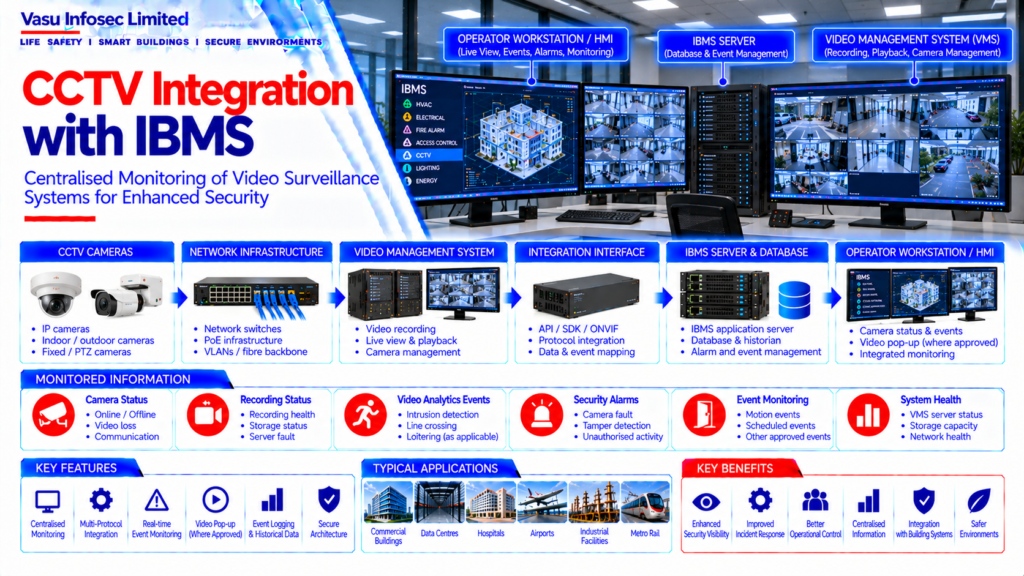
CCTV Integration with IBMS establishes a controlled interface between the dedicated video surveillance system and the Integrated Building Management System. The integration provides central supervisory visibility of camera status, alarms and approved video-related events while the dedicated Video Management System retains its primary recording, video processing and surveillance functions.
2. Integration Architecture
CCTV Cameras → Network Switches / Encoders → Video Management System (VMS) → Integration Interface / API / Gateway → IBMS Server → Database / HMI → Operator Workstation
Typical Information → Camera Status → Recording Status → Video Loss → Motion / Analytics Events → Storage / Server Fault → Communication Status → Other Approved Events
3. Integration Philosophy
The IBMS should provide monitoring and approved event integration without compromising the dedicated CCTV / VMS architecture. Recording, camera configuration, video management and security-critical functions should remain within the dedicated CCTV system unless specifically approved.
4. CCTV Camera Layer
CCTV cameras capture video and may provide status, motion detection, analytics or other approved event information. Camera selection, coverage, resolution, mounting and field of view should follow the approved surveillance design.
5. Network Infrastructure
CCTV cameras typically communicate through the dedicated IP network using Ethernet infrastructure. Network switches, fibre uplinks, PoE arrangements, VLANs and bandwidth should be coordinated with the approved CCTV network architecture.
6. Video Management System
The VMS provides central video recording, live viewing, playback, camera management, event handling and user access functions. IBMS integration should obtain only the approved status and event information from the VMS or designated interface.
7. Camera Status Monitoring
IBMS may monitor approved camera conditions such as online, offline, communication failure, video loss or other equipment status. Status points should be mapped to the correct camera identification.
8. Recording Status
Where supported, recording status or recorder health may be integrated into IBMS. Any recording failure or storage-related alarm should be clearly identified and routed according to the approved alarm philosophy.
9. Video Analytics Integration
Where analytics are implemented, approved events such as intrusion detection, line crossing, loitering or other project-defined analytics may be transmitted to IBMS. Analytics configuration and detection logic should remain under the dedicated VMS / CCTV architecture.
10. Alarm & Event Integration
CCTV-related events presented to IBMS may include camera fault, video loss, recorder fault, storage fault, analytics event and communication failure. The final event list should be based on the approved integration matrix.
11. Gateway / API Interface
Integration may use an approved API, SDK, gateway, ONVIF-supported interface or other manufacturer-supported method. Interface capabilities should be verified before final point mapping and commissioning.
12. Point & Event Mapping
The integration schedule should define camera IDs, recorder IDs, status points, alarm events, analytics events and communication health. Mapping should match the approved CCTV drawings, VMS database and IBMS graphics.
13. IBMS Graphics & HMI
IBMS graphics should clearly identify cameras, zones, equipment status and integrated events. Where video pop-up or live-view integration is approved, the interface should provide controlled access to the relevant VMS view.
14. Video Pop-Up Integration
Where supported and approved, a CCTV event may trigger a corresponding camera view or video pop-up at the operator workstation. The pop-up logic, camera association and operator permissions should be defined during system configuration.
15. Access & User Management
CCTV video and integrated information should be accessible only to authorised users. User permissions should distinguish monitoring, playback, configuration and other functions according to the approved security policy.
16. Cybersecurity
CCTV integration should follow the approved cybersecurity architecture, including network segregation, secure authentication, controlled remote access and protection of VMS and camera credentials.
17. Storage & Server Monitoring
VMS servers, recording servers and storage systems may provide approved health and capacity information to IBMS. Storage capacity, recording retention and video availability should remain managed through the dedicated VMS architecture.
18. Installation Requirements
Installation should verify:
- Correct camera devices
- Correct network switches
- Correct PoE arrangement
- Correct VMS configuration
- Correct integration interface
- Correct camera / event mapping
- Correct network addressing
- Correct alarm mapping
- Correct graphics
- Correct user permissions
- Proper cable segregation
19. Testing & Commissioning
CCTV-IBMS commissioning should verify:
- Camera status
- Video loss indication
- Recorder status
- Storage / server fault indication
- Analytics events, where applicable
- Gateway / API communication
- Point and event mapping
- Alarm indication
- Graphics
- Video pop-up, where approved
- Communication failure indication
20. Communication Failure
Loss of communication between the CCTV / VMS and IBMS should generate the approved communication fault indication. The dedicated CCTV system should continue its designed surveillance and recording functions independently of the IBMS interface.
21. Maintenance
Maintenance should include camera status verification, VMS health checks, storage monitoring, network diagnostics, gateway / API checks, point verification, alarm testing and configuration backup.
22. Design Change Control
Changes to cameras, VMS, network architecture, analytics, integration protocols, point lists, graphics or user permissions should be reviewed against the approved CCTV-IBMS integration design before implementation.
23. Documentation
CCTV integration documentation should include, as applicable:
- CCTV architecture
- Camera schedule
- VMS architecture
- Network topology
- Point / event list
- Integration matrix
- API / gateway details
- Alarm philosophy
- Graphics schedule
- User access matrix
- Testing and commissioning records
- As-built drawings
- O&M manual
24. Engineering Objective
The engineering objective is:
Reliable Video Surveillance → Dedicated VMS Processing & Recording → Controlled Integration → Accurate IBMS Status & Event Monitoring → Clear Security Alarms → Approved Video Pop-Up / Visibility → Secure User Access → Complete Testing → Reliable CCTV Supervision
SEO & Website Publishing Details
SEO title: CCTV Integration with IBMS: Architecture, Monitoring & Events
Meta description: Learn how CCTV integrates with IBMS for camera status, video loss, VMS health and approved security events, with key design, cybersecurity and commissioning considerations.
Suggested URL slug: /cctv-integration-with-ibms/
Primary keyword: CCTV integration with IBMS
Secondary keywords: VMS integration, CCTV camera status monitoring, IBMS security integration, video loss alarm, CCTV event mapping, video management system
Suggested image alt text: CCTV cameras and video management system connected to an IBMS operator workstation for status and event monitoring
Suggested excerpt: CCTV–IBMS integration provides central visibility of approved camera and VMS events while preserving the dedicated surveillance system’s recording and security functions.
Frequently Asked Questions
What is CCTV integration with IBMS?
It is an approved interface that allows IBMS to monitor selected CCTV camera, recorder and event information from the dedicated CCTV/VMS platform.
Which CCTV information can IBMS monitor?
Depending on the approved interface, this may include camera online/offline status, video loss, recorder or storage faults, communication status and defined analytics events.
Does IBMS replace the Video Management System?
No. The source article states that the VMS retains its primary recording, video processing and surveillance functions. IBMS provides supervisory visibility and approved event integration.
Can a CCTV event open a live video pop-up in IBMS?
Where supported by the interface and approved for the project, an event may trigger a corresponding camera view. Camera association and operator permissions should be configured and tested.
Which protocols or interfaces can be used?
The source identifies approved API, SDK, gateway, ONVIF-supported interface or another manufacturer-supported method. Actual capability must be confirmed for the selected equipment.
What should be checked during commissioning?
Verify camera and recorder status, video-loss and fault indications, event/point mapping, gateway or API communication, graphics, approved video pop-ups and communication-failure indication.