
Article
CCTV Storage Calculation
Oct 2026
Direct Answer
CCTV storage calculation estimates the capacity needed to retain recorded video for the required number of cameras and retention period. It should use the configured or approved bitrate for each camera group and account for recording hours, recording mode, codec, frame rate, audio where authorised, system overhead and RAID or other redundancy. The resulting usable capacity must then be checked against NVR/VMS recording throughput, network bandwidth and the required retention behaviour.
1. Engineering Overview
CCTV storage calculation determines the storage capacity required to retain recorded video for the specified number of cameras and retention period. The calculation should consider camera resolution, frame rate, codec, bitrate, recording mode, recording schedule, motion activity, audio where applicable, redundancy and the required retention period.
2. Storage Architecture
CCTV Cameras → Network → NVR / VMS Recording Server → Storage Array → RAID / Redundancy, where required → Video Database → Operator Workstation / Playback
3. Primary Storage Parameters
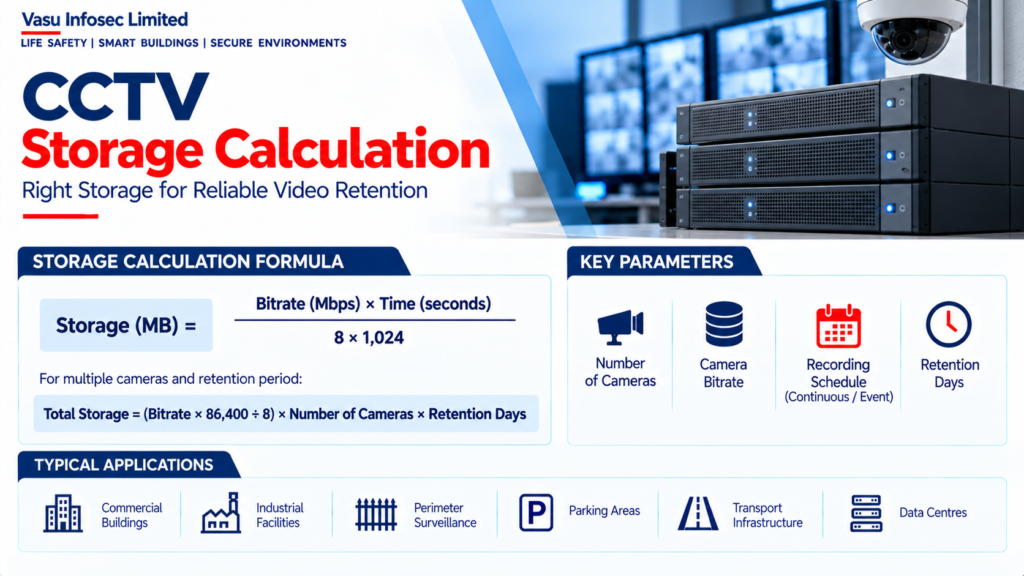
The key parameters are:
- Number of cameras
- Camera bitrate
- Recording frame rate
- Recording duration per day
- Number of retention days
- Recording mode
- Codec
- Audio requirement
- Storage overhead
- RAID / redundancy requirement
4. Bitrate-Based Calculation
A practical storage calculation can be based on the configured average video bitrate. For a camera bitrate B in Mbps and recording time T in seconds, the approximate raw storage is:
Storage (MB) = B × T ÷ 8
For multiple cameras, the per-camera storage is multiplied by the total number of cameras.
5. Daily Storage Calculation
For continuous recording:
Daily Storage = Bitrate (Mbps) × 86,400 seconds ÷ 8
The result should then be converted into GB or TB using the selected storage convention. The same calculation should be repeated for each camera profile where bitrates differ.
6. Retention Period
Required storage capacity is proportional to the retention period. For example:
Total Storage = Daily Storage × Required Retention Days
Retention should be established from the project specification, operational requirement or applicable policy.
7. Variable Camera Bitrates
Different cameras may operate at different bitrates due to resolution, frame rate, codec, scene complexity and configuration. Storage should therefore be calculated using the actual approved bitrate for each camera group rather than assuming one common value for all cameras.
8. Continuous Recording
Continuous recording stores video throughout the configured recording schedule. It provides comprehensive historical coverage but generally requires more storage than event-based recording.
9. Motion / Event Recording
Motion or event-based recording stores video when defined activity or events occur. This can reduce storage requirements, but the actual saving depends on scene activity, pre-event recording, post-event recording and event frequency.
10. Pre-Event & Post-Event Recording
Where event recording is used, pre-event and post-event recording durations should be included in the storage calculation. These periods ensure that video immediately before and after an event is retained.
11. Codec Consideration
Video codecs such as H.264 and H.265 can reduce storage and bandwidth requirements compared with less efficient encoding methods. The actual storage requirement should be based on the configured bitrate rather than codec name alone.
12. Resolution & Frame Rate
Higher resolution and frame rate generally increase the amount of video data generated. The selected configuration should balance surveillance performance with network and storage capacity.
13. Scene Complexity
Actual bitrate can vary with scene complexity, movement, lighting and image content. Storage calculations should use the manufacturer’s specified or project-approved bitrate and, where required, include an engineering margin.
14. Audio Storage
If audio recording is required, the associated audio data rate should be included in the storage calculation. Audio recording should only be enabled where authorised and required by the project.
15. Storage Overhead
Storage calculations should allow for appropriate system overhead, metadata, database requirements and operational margin. The final usable capacity should not be treated as equal to the nominal raw disk capacity.
16. RAID & Redundancy
Where RAID or other redundancy is required, usable storage is lower than the aggregate raw disk capacity. Storage sizing should therefore distinguish between raw capacity and usable capacity after the selected redundancy arrangement.
17. NVR Capacity
The NVR should be capable of supporting the total incoming recording bitrate, number of cameras, recording channels, storage capacity and required retention. Recording throughput should be checked in addition to disk capacity.
18. VMS Recording Server
For server-based VMS architecture, recording server capacity should consider camera count, aggregate bitrate, recording throughput, storage interface, database performance and number of concurrent playback / management operations.
19. Storage Expansion
The architecture should provide an appropriate expansion strategy where future cameras or increased retention may be required. Expansion capacity should be coordinated with rack space, power, network capacity and storage architecture.
20. Example Calculation Method
Example methodology:
- Establish camera quantity.
- Record approved bitrate for each camera group.
- Calculate daily data generated.
- Multiply by required retention days.
- Add required storage overhead.
- Apply RAID / redundancy requirements.
- Verify usable storage capacity.
- Verify NVR / VMS recording throughput.
- Verify network bandwidth.
- Document final storage capacity.
21. Installation & Configuration Requirements
Configuration should verify:
- Correct camera bitrate
- Correct resolution
- Correct frame rate
- Correct codec
- Correct recording schedule
- Correct retention period
- Correct motion / event settings
- Correct pre / post-event settings
- Correct storage allocation
- Correct RAID configuration
- Correct NVR / VMS capacity
22. Testing & Commissioning
Storage commissioning should verify:
- Camera recording
- Recording bitrate
- Recording schedule
- Playback
- Retention behaviour
- Storage utilisation
- RAID / redundancy status, where applicable
- Storage failure indication
- Recording server performance
- Backup / export functions
23. Storage Health Monitoring
Storage systems should be monitored for disk health, capacity utilisation, RAID status, recording failures, storage degradation and abnormal data growth. Appropriate alarms should be configured for critical storage conditions.
24. Design Change Control
Changes to camera quantity, resolution, frame rate, codec, bitrate, recording mode or retention period should trigger a review of storage capacity, recording throughput and network bandwidth.
25. Documentation
CCTV storage documentation should include, as applicable:
- Camera schedule
- Resolution and frame rate
- Bitrate schedule
- Codec
- Recording mode
- Recording hours per day
- Retention period
- Daily storage calculation
- Total storage calculation
- RAID / redundancy arrangement
- NVR / VMS capacity
- Storage expansion provision
- Testing and commissioning records
- As-built documentation
26. Engineering Objective
The engineering objective is:
Establish Camera Configuration → Determine Bitrate → Calculate Daily Data → Apply Recording Schedule → Apply Retention Period → Include Overhead & Redundancy → Verify Usable Storage → Confirm NVR / VMS Throughput → Complete Testing → Achieve Required Video Retention
Frequently Asked Questions
What information is needed for CCTV storage calculation?
At minimum, establish the number of cameras, bitrate, frame rate, recording duration per day, retention days, recording mode and codec. Include audio where applicable, storage overhead and redundancy requirements.
How is daily storage estimated from bitrate?
The source method is: Daily Storage = Bitrate (Mbps) × 86,400 seconds ÷ 8 for continuous recording. Convert the result to GB or TB using the storage convention selected for the project.
How does motion recording affect storage?
Motion/event recording can reduce storage, but savings depend on scene activity, event frequency and pre-event/post-event recording settings.
Is raw disk capacity the same as usable storage?
No. System overhead and RAID or other redundancy can reduce the capacity available for recorded video.
What must be checked besides disk capacity?
Verify NVR/VMS recording throughput, network bandwidth, camera recording settings, playback, retention behaviour, storage health and applicable redundancy status.
SEO & Publishing Details
| SEO title | CCTV Storage Calculation: Bitrate, Retention and RAID |
| Meta description | Learn how to estimate CCTV video storage from camera bitrate, recording hours, retention days, codec, motion recording, overhead and RAID redundancy. |
| Primary keyword | CCTV storage calculation |
| Secondary keywords | CCTV video storage; camera bitrate calculation; CCTV retention period; NVR storage capacity; VMS recording storage; RAID usable capacity; CCTV bandwidth calculation |
| Suggested URL slug | /cctv-storage-calculation/ |
| Suggested image alt text | CCTV storage architecture showing cameras, network, NVR/VMS recording server, storage array, RAID redundancy and operator playback. |