
Article
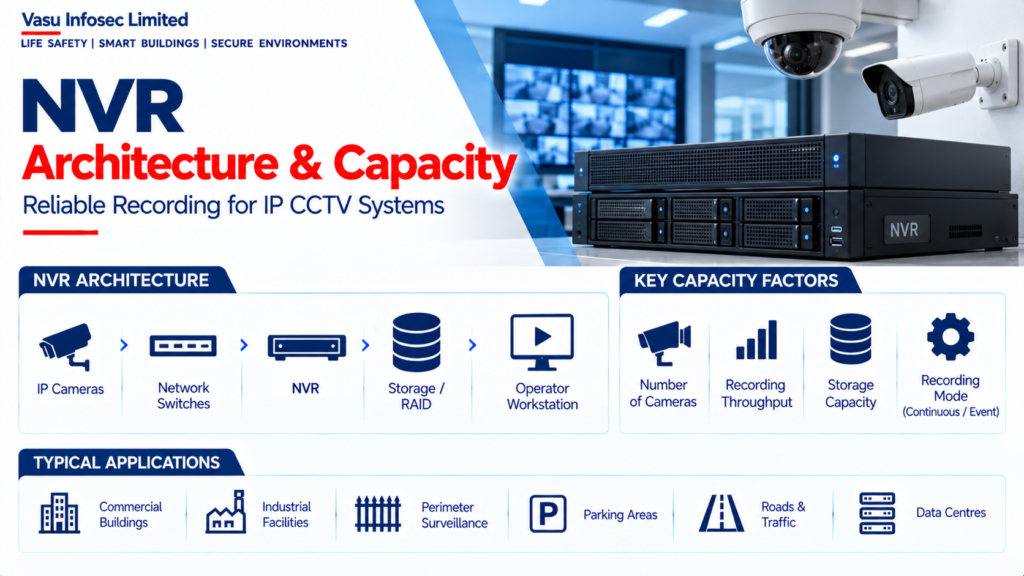
NVR Architecture & Capacity
Oct 2026
Direct Answer
A Network Video Recorder (NVR) receives, records, stores, manages and retrieves video streams from IP CCTV cameras. Its architecture and capacity should be selected using the camera count, aggregate incoming bitrate, recording throughput, storage retention, playback requirements, network capacity and required availability. The design should verify both channel capacity and recording throughput, distinguish raw disk capacity from usable capacity after RAID or other redundancy, and confirm integration, cybersecurity, power support and commissioning requirements.
1. Engineering Overview
A Network Video Recorder (NVR) is a dedicated platform for receiving, recording, storing, managing and retrieving video streams from IP CCTV cameras. NVR architecture should be sized according to camera count, incoming bitrate, recording configuration, storage retention, playback requirements, network capacity and required availability.
2. Complete NVR Architecture
IP CCTV Cameras → PoE / Network Access Switches → CCTV Network → NVR → Storage / RAID → Video Database → Operator Workstation / Video Wall
Supporting Infrastructure → UPS → Network Management → Time Synchronisation → VMS / Client Software → Cybersecurity
3. NVR Core Functions
The NVR may provide camera registration, live viewing, video recording, playback, event search, storage management, user access, system health monitoring and approved camera configuration functions.
4. Camera Channel Capacity
NVR channel capacity defines the number of cameras that can be registered or recorded by the unit. The selected capacity should include the current camera count and appropriate provision for approved future expansion.
5. Recording Throughput
Recording throughput is the aggregate incoming video bitrate that the NVR can process and write to storage. The NVR should be selected so that total camera bitrate remains within the manufacturer’s supported recording throughput with suitable engineering margin.
6. Storage Capacity
NVR storage should be sized based on camera count, bitrate, resolution, frame rate, codec, recording schedule and retention period. The calculation should distinguish raw disk capacity from usable capacity after RAID or other redundancy arrangements.
7. NVR Storage Architecture
NVR storage may use internal disks, dedicated storage arrays or other approved storage architectures. Disk configuration should support the required recording workload, retention period and availability requirements.
8. RAID & Redundancy
Where required, RAID or other redundancy arrangements can provide protection against individual disk failure. The selected RAID configuration affects usable storage capacity and should be incorporated into the storage calculation.
9. Recording Modes
NVRs may support continuous recording, scheduled recording, motion recording, event recording or combinations of these modes. The selected recording mode should correspond with the approved surveillance and retention requirements.
10. Pre-Event & Post-Event Recording
For event-based recording, the NVR may retain video immediately before and after an event. These durations should be configured and included in the overall storage calculation.
11. Resolution & Frame Rate
The NVR should support the resolution and frame rate of all connected cameras. Higher camera configurations generally increase recording throughput and storage requirements.
12. Codec Support
The NVR should support the video codecs used by the selected cameras. H.264, H.265 and other approved codecs may be supported depending on the equipment. Actual storage and throughput should be based on the configured bitrate.
13. Network Interface
NVR network interfaces should be sized for the aggregate incoming camera traffic and required client / playback traffic. Network interface capacity should be coordinated with the CCTV network architecture.
14. Playback & Export
The NVR should support authorised playback, search, event filtering and video export. Export functionality should preserve the required video evidence and associated timestamp / metadata where supported.
15. User Management
NVR access should be controlled through authorised user accounts and role-based permissions. Live viewing, playback, export, PTZ control, configuration and administrative functions should be appropriately restricted.
16. VMS Integration
Where a VMS is used, the NVR should be compatible with the approved VMS architecture. Camera registration, recording, live viewing, playback and event information should be verified during integration.
17. Health Monitoring
NVR health monitoring should identify critical conditions such as camera offline status, disk failure, storage capacity issues, recording failure, network faults and system alarms where supported.
18. Time Synchronisation
NVRs and connected cameras should use a coordinated time reference where required. Accurate timestamps are essential for video search, event correlation and incident investigation.
19. UPS & Power Architecture
NVRs and associated storage equipment should be supplied through the approved electrical distribution. Critical recording infrastructure should be supported by UPS where required to maintain recording during short-duration power interruptions.
20. Cybersecurity
NVRs should be incorporated into the approved CCTV cybersecurity architecture. Controls may include secure credentials, role-based access, network segmentation, restricted services, firmware management, controlled remote access and configuration backup.
21. Installation Requirements
Installation should verify:
- Correct NVR model
- Correct channel capacity
- Correct recording throughput
- Correct storage capacity
- Correct RAID configuration
- Correct network connectivity
- Correct IP addressing
- Correct camera registration
- Correct time synchronisation
- Correct user permissions
- Correct UPS supply
22. Testing & Commissioning
NVR commissioning should verify:
- Camera registration
- Live video
- Recording
- Playback
- Search
- Video export
- Storage utilisation
- RAID / disk health
- Recording throughput
- Camera offline alarms
- Network communication
- User permissions
- Time synchronisation
23. Capacity Verification
Final NVR capacity verification should consider:
- Total number of cameras
- Aggregate incoming bitrate
- Maximum supported recording throughput
- Number of simultaneous playback users
- Required retention period
- Storage overhead
- RAID / redundancy
- Future expansion
- Network bandwidth
24. Maintenance
Maintenance should include disk health checks, storage utilisation monitoring, camera registration review, recording verification, firmware / configuration review, backup verification, cooling and power checks and inspection of system alarms.
25. Design Change Control
Changes to camera count, resolution, frame rate, codec, bitrate, recording mode, retention period, storage configuration or VMS integration should trigger an NVR capacity and performance review.
26. Documentation
NVR documentation should include, as applicable:
- NVR schedule
- Channel capacity
- Recording throughput
- Camera schedule
- Storage calculation
- RAID configuration
- Network architecture
- IP address schedule
- Recording configuration
- Retention schedule
- VMS integration details
- Testing and commissioning records
- As-built documentation
- O&M manual
27. Engineering Objective
The engineering objective is:
Establish Camera Count → Determine Aggregate Bitrate → Select NVR Channel & Throughput Capacity → Calculate Storage → Apply RAID / Redundancy → Verify Network & Playback Capacity → Complete Testing → Achieve Reliable CCTV Recording & Retrieval
Frequently Asked Questions
What determines NVR capacity?
Key factors include camera channel count, aggregate incoming bitrate, supported recording throughput, storage retention, simultaneous playback requirements, network bandwidth and future expansion.
Is channel capacity enough to select an NVR?
No. The NVR must also support the aggregate incoming bitrate and recording workload, as well as the required storage and playback performance.
How should NVR storage be sized?
Use the approved camera configuration, bitrate, resolution, frame rate, codec, recording schedule and retention period. Distinguish raw disk capacity from usable capacity after the selected RAID or redundancy arrangement.
Why is time synchronisation important?
Coordinated timestamps support video search, event correlation and incident investigation.
What should be tested during commissioning?
Verify camera registration, live video, recording, playback, search, export, storage utilisation, disk/RAID health, recording throughput, offline alarms, network communication, user permissions and time synchronisation.
SEO & Publishing Details
| SEO title | NVR Architecture and Capacity Planning for CCTV Systems |
| Meta description | Learn NVR architecture and capacity planning, including camera channels, recording throughput, storage, RAID, network interfaces, VMS integration and commissioning. |
| Primary keyword | NVR architecture and capacity |
| Secondary keywords | CCTV NVR capacity; NVR recording throughput; NVR storage sizing; CCTV recording server; NVR RAID configuration; VMS integration; CCTV network bandwidth |
| Suggested URL slug | /nvr-architecture-capacity/ |
| Suggested image alt text | NVR architecture showing IP CCTV cameras, PoE switches, CCTV network, NVR, storage RAID, video database and operator workstation with supporting infrastructure. |