
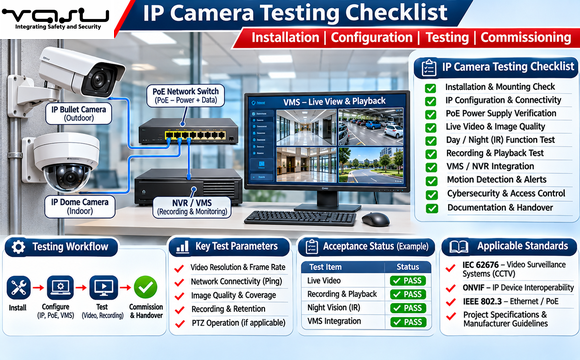
Technical Checklist / Template
IP Camera Testing Checklist – Installation, Configuration & Commissioning
Nov 2026
1. Introduction
IP Camera Testing and Commissioning is an essential process to verify the installation, network connectivity, video quality, recording functionality and operational reliability of an IP-based CCTV surveillance system.
This checklist provides a structured approach for inspecting, testing and commissioning IP cameras, network switches, Network Video Recorders (NVRs) and Video Management Systems (VMS).
2. Objective
- Verify correct IP camera installation.
- Confirm network connectivity and communication.
- Check live video quality and camera coverage.
- Verify recording and playback functionality.
- Test integration with NVR and VMS.
- Ensure compliance with approved project specifications.
3. IP Camera Installation Checklist
| Sr. No. | Inspection Parameter | Status |
|---|---|---|
| 1 | Camera location verified against approved drawings | ☐ |
| 2 | Camera mounting height and position checked | ☐ |
| 3 | Camera mounting bracket securely installed | ☐ |
| 4 | Camera orientation and viewing angle adjusted | ☐ |
| 5 | Indoor / outdoor camera suitability verified | ☐ |
| 6 | IP rating verified as per project requirement | ☐ |
| 7 | Cable routing and termination checked | ☐ |
| 8 | Junction boxes and connectors properly secured | ☐ |
| 9 | Weatherproofing completed for outdoor cameras | ☐ |
| 10 | Camera identification labels provided | ☐ |
4. Network Configuration Checklist
| Sr. No. | Test Parameter | Status |
|---|---|---|
| 1 | Camera IP address configured | ☐ |
| 2 | Subnet mask verified | ☐ |
| 3 | Default gateway configured | ☐ |
| 4 | IP address conflict checked | ☐ |
| 5 | Network connectivity verified using Ping | ☐ |
| 6 | VLAN configuration checked, where applicable | ☐ |
| 7 | Network switch port connectivity verified | ☐ |
| 8 | PoE power supply verified | ☐ |
| 9 | Network bandwidth availability checked | ☐ |
| 10 | NTP / time synchronization configured | ☐ |
5. Camera Functional Testing
| Sr. No. | Test Parameter | Status |
|---|---|---|
| 1 | Live video streaming verified | ☐ |
| 2 | Daytime image quality checked | ☐ |
| 3 | Night vision / IR function tested | ☐ |
| 4 | Focus and image sharpness verified | ☐ |
| 5 | Field of view and coverage checked | ☐ |
| 6 | Resolution and frame rate configured | ☐ |
| 7 | Brightness and contrast adjusted | ☐ |
| 8 | WDR functionality tested, where applicable | ☐ |
| 9 | Motion detection configured, where applicable | ☐ |
| 10 | PTZ operation tested for PTZ cameras | ☐ |
| 11 | Camera reboot and recovery tested | ☐ |
| 12 | Video loss detection verified | ☐ |
6. NVR / VMS Integration Testing
| Sr. No. | Test Parameter | Status |
|---|---|---|
| 1 | Camera successfully added to NVR / VMS | ☐ |
| 2 | Camera communication status verified | ☐ |
| 3 | Live video displayed on monitoring workstation | ☐ |
| 4 | Recording schedule configured | ☐ |
| 5 | Continuous recording tested, where specified | ☐ |
| 6 | Event-based recording tested, where specified | ☐ |
| 7 | Playback functionality verified | ☐ |
| 8 | Video export and backup tested | ☐ |
| 9 | Storage capacity and retention settings verified | ☐ |
| 10 | User access permissions checked | ☐ |
| 11 | Camera failure and video loss alarms tested | ☐ |
| 12 | Multi-camera display and switching verified | ☐ |
7. Cybersecurity & System Security Checks
| Sr. No. | Inspection Parameter | Status |
|---|---|---|
| 1 | Default camera passwords changed | ☐ |
| 2 | Strong authentication configured | ☐ |
| 3 | Unused services and ports disabled, where appropriate | ☐ |
| 4 | Camera firmware version verified | ☐ |
| 5 | Access permissions configured | ☐ |
| 6 | Secure network access verified | ☐ |
| 7 | Remote access restricted as per project policy | ☐ |
| 8 | Configuration backup maintained | ☐ |
8. IP Camera Testing Record
| Parameter | Test Result |
|---|---|
| Camera ID | __________ |
| Camera Location | __________ |
| Manufacturer / Model | __________ |
| Camera IP Address | __________ |
| Resolution | __________ |
| Frame Rate (FPS) | __________ |
| Video Compression | __________ |
| PoE Status | __________ |
| Recording Status | __________ |
| Day / Night Test | Pass / Fail |
| VMS Integration | Pass / Fail |
| Final Test Status | Pass / Fail |
9. Common Issues During Testing
| Observation | Possible Cause |
|---|---|
| No video feed | Power supply or network connectivity issue |
| Blurred image | Incorrect focus or lens adjustment |
| Video lag | Insufficient network bandwidth |
| Camera offline | IP conflict or network switch issue |
| No night vision | IR illumination or configuration issue |
| Recording failure | NVR storage or recording configuration issue |
| Incorrect timestamp | NTP or time synchronization issue |
| Frequent disconnection | Network instability or PoE power issue |
10. Commissioning Documentation
The following documents should be submitted during final handover:
- Approved CCTV Layout Drawings.
- IP Camera Technical Datasheets.
- Camera IP Address Schedule.
- Network Architecture Diagram.
- Camera Installation Inspection Report.
- Network Connectivity Test Report.
- Camera Functional Testing Report.
- NVR / VMS Configuration Report.
- Recording and Playback Test Report.
- Camera Coverage Verification Report.
- As-Built Drawings.
- Operation & Maintenance Manuals.
- Warranty Certificates.
- Final Commissioning and Handover Report.
11. Acceptance Criteria
The IP Camera System should be accepted after confirming:
- All cameras are installed at approved locations.
- Network connectivity is stable.
- Required video resolution and image quality are achieved.
- Day and night viewing functions operate correctly.
- Recording and playback functions are verified.
- NVR / VMS integration is successful.
- Storage and retention requirements are met.
- Cybersecurity settings are implemented.
- All critical observations are closed.
- Commissioning documents are submitted.
12. Applicable Standards & References
- IEC 62676 Series – Video Surveillance Systems for Security Applications.
- ONVIF Specifications – IP-based Video Surveillance Device Interoperability.
- IEEE 802.3 – Ethernet and Power over Ethernet (PoE), as applicable.
- Project-specific CCTV specifications and approved network architecture.
- Manufacturer installation, configuration and commissioning manuals.
13. Frequently Asked Questions (FAQs)
Q1. What is an IP Camera Testing Checklist?
It is a structured inspection document used to verify IP camera installation, network connectivity, video quality, recording and system integration.
Q2. What tests are performed during IP camera commissioning?
Installation inspection, IP configuration, network connectivity, live video, day/night operation, recording, playback and VMS integration tests.
Q3. What is PoE in an IP Camera System?
Power over Ethernet (PoE) allows compatible IP cameras to receive electrical power and network connectivity through a single Ethernet cable.
Q4. Why is NTP configuration important?
NTP synchronizes camera and recording system timestamps, supporting accurate event investigation and video evidence retrieval.
Q5. What is ONVIF?
ONVIF is an industry standardization initiative that supports interoperability between compatible IP-based physical security products.
Q6. How is IP camera recording verified?
Recording is verified by checking configured recording schedules, retrieving recorded footage, reviewing playback and confirming the required retention settings.
14. Conclusion
IP Camera Testing and Commissioning ensures reliable video surveillance, stable network communication and effective security monitoring.
A systematic inspection and testing process helps identify installation defects, network issues and recording failures before final project handover.